
AI Text to YouTube Video Generator
Create YouTube video content from text. Describe scenes for Shorts, intros, or backgrounds and generate clips to review.
AI Video Generator
0/20000 characters
Cost:10
My videos
Loading...

What is an AI text to YouTube video generator?
An AI text to YouTube video generator creates video clips from text descriptions optimized for YouTube content. You describe the scene, motion, and format—vertical for Shorts or horizontal for standard videos—choose settings, and the tool produces a clip you can review and download for your channel.
AI Text to YouTube Video Generator
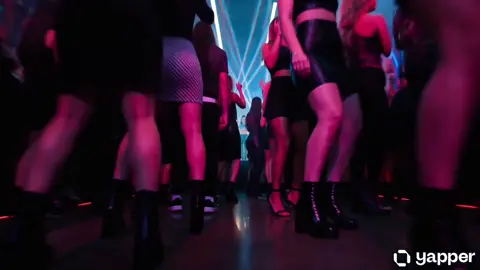
YouTube Shorts Clip
Input
A vertical shot of a person walking through a neon-lit city at night, vibrant colours, fast-paced cuts every few seconds, energetic music visualiser on the side.
Expected output
A vertical Shorts-style clip with neon lighting and fast pacing.
Channel Intro Sequence
Input
A modern tech studio with multiple monitors on a desk, RGB lighting, camera orbits the setup, channel name fades in with a glow effect.
Expected output
A tech studio intro clip with orbiting camera and glow text.
Tutorial Background
Input
A clean white desk with a laptop, notebook, and coffee cup, bright natural lighting, camera holds a steady medium shot, soft background blur.
Expected output
A tutorial background clip with natural lighting and steady framing.
Generate video content suitable for YouTube from text descriptions
No Filming Required
Create YouTube-ready video content by describing scenes in text instead of setting up cameras and lighting.
Multiple Video Formats
Generate vertical Shorts clips, standard intro sequences, and background footage from the same text-to-video workflow.
Fast Content Creation
Produce visual assets for multiple videos quickly by changing the scene description between generations.
How It Works
1
Describe the scene
Describe the desired scene and motion.
2
Choose settings
Choose the available generation settings.
3
Generate and review
Generate, review, and download a suitable result.
Tips for YouTube content prompts
Think about format, framing, and pacing when describing YouTube video content.
Input Constraints
- Avoid using trademarked channel names, branded content, or copyrighted music references.
- Do not upload personal or sensitive material without permission.
- Keep descriptions appropriate for YouTube community guidelines.
Practical Tips
- Specify the format such as vertical for Shorts or horizontal for standard videos.
- Describe the pacing such as fast cuts, steady shot, or slow motion for the right energy.
- Include visual branding elements like colours, text overlays, or glow effects for channel consistency.
Privacy
- Do not upload personal or sensitive material unless you have permission to use it.
Usage Rights
- Confirm that you have the rights needed for the inputs and intended use of the result.
Prompt recipes
Copy a structure, then adjust the subject, lighting, camera, and output details for your own result.
Vertical Shorts hook
Vertical 9:16 shot of a hand swiping through phone apps in rapid succession, neon glow effects, fast cuts every 2 seconds, energetic tech vibe.
Uses vertical format, fast pacing, and glow effects to match the high-energy style of YouTube Shorts and grab attention quickly.
Channel intro with branding
A modern tech workspace with dual monitors and RGB keyboard, camera orbits slowly, channel name 'TechTalk' fades in with blue glow, professional lighting.
Combines camera movement, visual branding, and professional lighting to create a reusable intro that sets channel tone.
Tutorial steady background
A clean white desk with laptop, notebook, and coffee cup, soft natural window light, camera holds a steady medium shot, minimal motion, slightly blurred background.
Uses steady framing and minimal motion to create a non-distracting background that supports narration and screen recordings.
Gaming montage transition
A gaming setup with RGB lights, keyboard and mouse on a dark desk, camera zooms in slowly, screen glowing with colorful game UI, intense focus atmosphere.
Combines RGB lighting, zoom, and gaming atmosphere to create a dynamic transition or intro for gaming content.
Vlog-style street walk
First-person view walking through a busy city street at golden hour, people passing by, storefronts and street signs visible, handheld camera feel, natural sound atmosphere.
Uses first-person perspective and handheld motion to create an immersive vlog-style clip that feels personal and authentic.
Best use cases
Match the workflow to the input you have and the result you need before opening the generator.
YouTube Shorts
Input: Vertical scene with fast pacing, bright colors, and clear subject—hook in first 2 seconds
Result: A vertical 9:16 clip optimized for mobile viewing and fast engagement
Tool: Text to video with vertical aspect ratio and fast-cut or energetic motion keywords
Channel intro or branding
Input: Studio or workspace with branding elements, orbiting camera, and text overlay space
Result: A reusable intro clip that establishes channel identity and tone
Tool: Text to video with camera-movement keywords and specific branding color or text placement
Tutorial or explainer background
Input: Clean desk or workspace with steady framing, natural light, minimal motion
Result: A non-distracting background that supports screen recordings and narration
Tool: Text to video with steady camera and soft lighting keywords
Vlog or lifestyle B-roll
Input: Street, nature, or indoor scene with handheld camera feel and natural motion
Result: An authentic-feeling clip that adds visual variety to narration or voiceover
Tool: Text to video with handheld or first-person perspective keywords
Limitations to know before generating
- The tool generates short clips from text; full-length YouTube videos require assembling multiple clips or adding narration and screen recordings.
- Vertical format works best for Shorts; standard videos need horizontal 16:9 descriptions.
- Generated clips do not include audio; you must add music, voiceover, or sound effects separately.
- You are responsible for ensuring your prompt and intended use comply with YouTube community guidelines and copyright requirements.
- The tool does not support embedded text or channel branding within the generated scene; add overlays in post-production.
Creative Suite: AI Video Generator & AI Image Generator Tools
Power up your creative workflow with our AI-driven tools. Generate stunning videos, create images, and apply custom adjustments - our AI Video Generator and AI Image Generator offer a complete solution for all your creative needs.
Strictly Prohibits Adult/NSFW Content








Pricing
Choose the credit package that works best for you.
No hidden fees • Cancel anytime • Unused credits roll over
Starter
Perfect for trying out AI creation.
Credits
200 credits / month
- Up to 20 videos per month
- Up to 100 images per month
$6.99/ month$9.9930% OFF
Billed monthly
First-time subscribers get 30% off their first month, then standard price
What's included
- Credits never expire
- Standard models
- HD, Watermark-Free Downloads
- Private Generation
- Faster Generation Speed
- Ad-free experience
Basic
Perfect for light creators.
Credits
500 credits / month
- Up to 50 videos per month
- Up to 250 images per month
$13.99/ month$19.9930% OFF
Billed monthly
First-time subscribers get 30% off their first month, then standard price
What's included
- Credits never expire
- Standard models
- HD, Watermark-Free Downloads
- Private Generation
- Faster Generation Speed
- Ad-free experience
Pro
PopularBest value for creators
Credits
1,200 credits / month
- Up to 120 videos per month
- Up to 600 images per month
$39.99/ month
Billed monthly
What's included
- Credits never expire
- All models + Early access to new models
- HD, Watermark-Free Downloads
- Private Generation
- Faster Generation Speed
- Ultra HD resolution
- Ad-free experience
Ultra
For video creators and power users.
Credits
5,000 credits / month
- Up to 500 videos per month
- Up to 2,500 images per month
$99.99/ month
Billed monthly
What's included
- Credits never expire
- All models + Early access to new models
- HD, Watermark-Free Downloads
- Private Generation
- Faster Generation Speed
- Ultra HD resolution
- Ad-free experience
Free
Standard models only — upgrade to unlock premium models.
Credits
10 free credits on signup
Questions? Contact us at support@domer.io
Ready to create YouTube content?
Open the tool, describe your scene, and generate a video for your channel.