
Colossyan AI Educational Video Generator
Describe teaching scenes and learning environments in text. Generate educational video clips and review results before use.
AI Video Generator
0/20000 characters
Cost:10
My videos
Loading...
What is the Colossyan AI educational video generator?
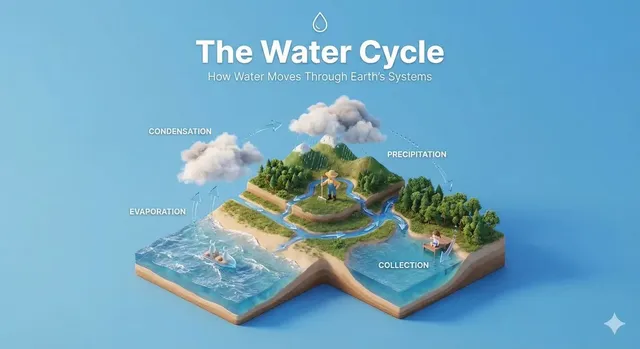
It generates educational video clips from written descriptions of teaching scenes. You describe the learning environment, instructor actions, learners, and subject matter, then the tool creates a video you can review and download.
Colossyan AI Educational Video Generator
Classroom teaching moment
Input
A teacher standing at a whiteboard in a bright classroom, pointing at a diagram of the solar system, students at desks looking up attentively.
Expected output
A classroom scene with a teacher at the whiteboard, students watching, and educational diagrams visible.
Science experiment demonstration
Input
A lab coat scientist pouring a colored liquid into a beaker on a lab bench, steam rising, test tubes in a rack beside them.
Expected output
A laboratory scene with a pouring action, colored liquid, and steam effect in a scientific setting.
Online lesson setup
Input
A person sitting at a desk with a laptop and notebook, a cork board with notes and diagrams on the wall behind them, warm study lamp.
Expected output
A study or home-office scene with a learner at a desk, study materials visible, and warm focused lighting.
Generate educational video scenes from written descriptions of teaching moments, demonstrations, or learning environments.
Educational scenes from text
Describe teaching moments, classroom settings, or demonstration scenes in text and generate matching video clips.
Create content without filming
Generate educational video scenes without classroom setups, actors, or filming equipment.
Iterate on lesson visuals
Adjust the scene description to change the setting, teaching style, or subject matter quickly.
How It Works
1
Describe the scene
Describe the desired scene and motion.
2
Choose settings
Choose the available generation settings.
3
Generate and download
Generate, review, and download a suitable result.
Creating educational video scenes
Describe the learning environment, instructor, learners, and the educational activity taking place.
Input Constraints
- The tool generates video from text prompts.
- Results depend on the detail in your description.
- Review each video before using it in educational content.
Practical Tips
- Describe the learning environment — classroom, lab, home study.
- Include the instructor or presenter and what they are doing.
- Add learners and their reactions for interactive scenes.
- Mention the subject matter visually — diagrams, equipment, materials.
Privacy
- Do not upload personal or sensitive material unless you have permission to use it.
Usage Rights
- Confirm that you have the rights needed for the inputs and intended use of the result.
Prompt recipes
Copy a structure, then adjust the subject, lighting, camera, and output details for your own result.
STEM demonstration for online course
A physics teacher at a lab table demonstrating a pendulum experiment, hand releasing the pendulum, camera focused on the swinging motion, bright classroom lighting, students visible in the background.
Clear subject (teacher, pendulum), specific action (releasing, swinging), and context (classroom). Demonstrations with visible motion are easier to render and more engaging.
Language learning conversation scene
Two people sitting at a cafe table, one holding flashcards and gesturing while speaking, the other nodding and repeating, warm afternoon light, casual setting.
Conversational learning with clear props (flashcards) and body language. Casual setting makes the scene relatable and less formal.
Art instruction close-up
A hand holding a paintbrush applying watercolor to paper, close-up shot of the brush strokes, palette and water jar in the background, natural window light.
Close-up framing keeps focus on the technique. Art and craft scenes benefit from showing the process step-by-step with clear lighting.
Coding tutorial screen and hands
Hands typing on a keyboard in front of a laptop screen showing code editor, camera over-the-shoulder view, desk lamp illuminating the workspace, calm focus.
Over-the-shoulder perspective is standard for coding tutorials. Screen and hands in frame create a clear 'follow along' setup.
Math problem walkthrough
A teacher standing beside a large whiteboard, writing out a math equation step by step, pausing to circle key numbers, students in the foreground watching, bright fluorescent classroom lighting.
Step-by-step writing action mirrors real teaching flow. Pausing and circling are visual cues that help learners follow the logic.
Virtual lecture setup
A lecturer sitting at a desk with a ring light and camera, gesturing while speaking to the camera, bookshelf in the background, clean home-office aesthetic.
Home lecture setup is familiar to online learners. Ring light and bookshelf signal professionalism and focus.
Best use cases
Match the workflow to the input you have and the result you need before opening the generator.
Online course explainer video
Input: Instructor demonstrating a concept or process
Result: Short clip showing the teaching moment clearly
Tool: Text-to-video with over-the-shoulder or frontal framing
Training module B-roll
Input: Workplace or lab setting with equipment and activity
Result: Scene that illustrates the training context
Tool: Text-to-video with wide framing and environmental detail
Social media edu-content
Input: Quick demo or fact with visual hook
Result: 3-10 second clip for reels, shorts, or TikTok
Tool: Text-to-video with close-up or dynamic framing
Student presentation placeholder
Input: Classroom or study scene matching presentation topic
Result: Background or intro clip for student projects
Tool: Text-to-video with classroom or study environment
Limitations to know before generating
- Human faces and expressions may render inconsistently, especially in close-ups.
- Complex multi-person interactions are harder to generate with natural body language.
- Text on whiteboards or screens may be illegible or distorted.
- Generated clips are short; full lessons require multiple clips or editing.
- You are responsible for confirming you have the rights to use the clips in your educational content.
Creative Suite: AI Video Generator & AI Image Generator Tools
Power up your creative workflow with our AI-driven tools. Generate stunning videos, create images, and apply custom adjustments - our AI Video Generator and AI Image Generator offer a complete solution for all your creative needs.
Strictly Prohibits Adult/NSFW Content








Pricing
Choose the credit package that works best for you.
No hidden fees • Cancel anytime • Unused credits roll over
Starter
Perfect for trying out AI creation.
Credits
200 credits / month
- Up to 20 videos per month
- Up to 100 images per month
$6.99/ month$9.9930% OFF
Billed monthly
First-time subscribers get 30% off their first month, then standard price
What's included
- Credits never expire
- Standard models
- HD, Watermark-Free Downloads
- Private Generation
- Faster Generation Speed
- Ad-free experience
Basic
Perfect for light creators.
Credits
500 credits / month
- Up to 50 videos per month
- Up to 250 images per month
$13.99/ month$19.9930% OFF
Billed monthly
First-time subscribers get 30% off their first month, then standard price
What's included
- Credits never expire
- Standard models
- HD, Watermark-Free Downloads
- Private Generation
- Faster Generation Speed
- Ad-free experience
Pro
PopularBest value for creators
Credits
1,200 credits / month
- Up to 120 videos per month
- Up to 600 images per month
$39.99/ month
Billed monthly
What's included
- Credits never expire
- All models + Early access to new models
- HD, Watermark-Free Downloads
- Private Generation
- Faster Generation Speed
- Ultra HD resolution
- Ad-free experience
Ultra
For video creators and power users.
Credits
5,000 credits / month
- Up to 500 videos per month
- Up to 2,500 images per month
$99.99/ month
Billed monthly
What's included
- Credits never expire
- All models + Early access to new models
- HD, Watermark-Free Downloads
- Private Generation
- Faster Generation Speed
- Ultra HD resolution
- Ad-free experience
Free
Standard models only — upgrade to unlock premium models.
Credits
10 free credits on signup
Questions? Contact us at support@domer.io
Create educational video scenes
Describe your learning scene, generate a video, and review the result. Open the text-to-video tool to start.