
Create
AI Image Generator for Product Photos
Generate product photos from text prompts. Describe the item and background, then review and download images for your listings.
AI Image Generator
0/20000 characters
My images
Loading...
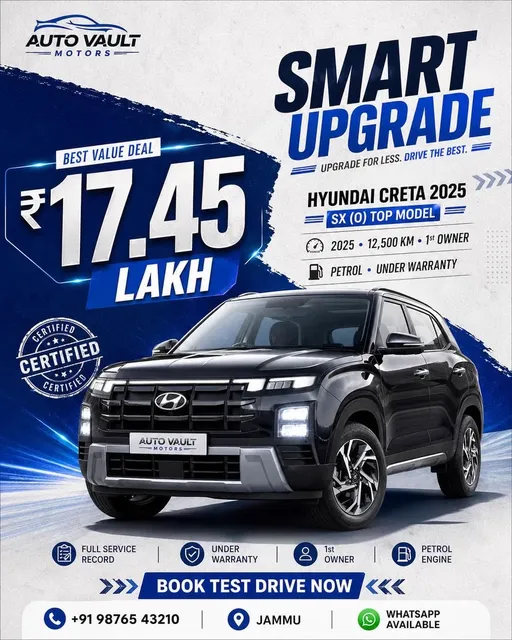
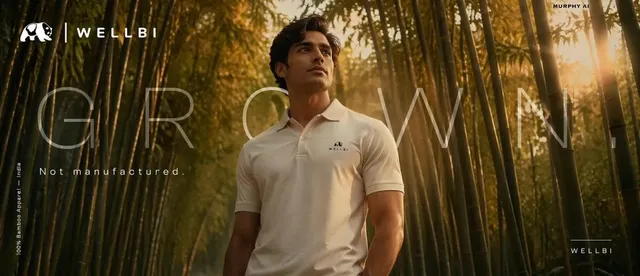

What is an AI image generator for product photos?
An AI image generator for product photos creates listing-ready visuals from text descriptions. You describe the product, background, and lighting, then the tool generates an image you can review and download for online stores, catalogs, or marketing materials.
AI Image Generator for Product Photos
Neutral listing background
Input
A ceramic vase on a warm beige backdrop, soft diffused light, centered composition, product listing photo
Expected output
A tidy listing-style photo of the vase with a calm neutral background
Seasonal styled shot
Input
A soy candle in a glass jar with a small sprig of pine beside it, cozy winter styling, warm light
Expected output
A styled seasonal product photo with subtle winter props and warm tones
Feature-focused angle
Input
A mechanical keyboard photographed from a low side angle to show the keycap profile, clean desk surface, bright light
Expected output
An angled product photo that draws attention to the keyboard's keycap shape
Create listing-ready product photos from text descriptions for e-commerce, marketing, or catalog use
Photos without a camera
Create product photo concepts from text when samples, lighting, or time are not available.
Test scenes quickly
Swap the backdrop or props in the prompt and generate a new version in moments.
Choose before committing
Generate several options, compare them, and keep only the photo that fits the listing.
How It Works
1
Describe the product
Describe the desired image.
2
Pick generation settings
Choose the available generation settings.
3
Generate and review
Generate, review, and download a suitable result.
Making listing-style product photos
Choose a background that does not fight with the product, and keep styling minimal unless the scene is part of the listing concept.
Input Constraints
- Describe the product, background, and lighting in the prompt
- Avoid text or watermarks that you did not ask for
- Review the image for warped packaging or misshapen details
Practical Tips
- Use 'listing photo' or 'product page photo' to signal the style
- Name the background color so the series stays consistent
- Keep the product large in the frame for a clearer result
Privacy
- Do not upload personal or sensitive material unless you have permission to use it.
Usage Rights
- Confirm that you have the rights needed for the inputs and intended use of the result.
Prompt recipes
Copy a structure, then adjust the subject, lighting, camera, and output details for your own result.
Clean white-background e-commerce shot
A stainless steel travel mug centered on a pure white background, soft even lighting from above, product listing style, no shadows
Pure white backgrounds and centered framing are standard for online marketplaces, making the product easy to see and compare.
Warm lifestyle context with props
A ceramic coffee mug on a wooden table with a folded linen napkin beside it, natural morning light through a window, cozy breakfast scene
Lifestyle props and natural light create an inviting context that suggests how the product fits into daily life.
Seasonal holiday styling
A gift box wrapped in kraft paper with a red ribbon, small pine cone and evergreen sprig beside it, soft warm lighting, holiday product photo
Seasonal props and warm tones create a timely, festive mood that increases relevance during holiday shopping.
Angled detail shot for texture
A leather wallet shot from a low side angle on a dark slate surface, showing the grain and stitching, focused lighting on the product
Low angles and focused lighting highlight material quality and craftsmanship, useful for premium or handmade products.
Floating product on gradient
A wireless earbud case floating above a soft blue-to-white gradient background, gentle drop shadow below, modern tech product style
Floating products on gradients create a modern, tech-forward aesthetic without distracting clutter.
Best use cases
Match the workflow to the input you have and the result you need before opening the generator.
Marketplace listing photo
Input: Product name, white or neutral background, centered framing, listing-photo language
Result: Clean, simple product image meeting marketplace photo guidelines
Tool: AI Image Generator with white-background prompt
Lifestyle product shot for ads
Input: Product in real-world setting, natural lighting, complementary props
Result: Contextual scene showing the product in use with relatable atmosphere
Tool: AI Image Generator with lifestyle and prop details
Seasonal or holiday catalog
Input: Product with seasonal props, warm or festive lighting, themed styling
Result: Holiday-appropriate product photo with seasonal mood
Tool: AI Image Generator with seasonal keyword and prop descriptions
Detail or feature highlight
Input: Angled or close view, specific feature focus, clean background
Result: Image emphasizing texture, craftsmanship, or a key product feature
Tool: AI Image Generator with angle and detail keywords
Limitations to know before generating
- Generated images are concept photos, not actual product photography; lighting and detail accuracy may vary
- Text, logos, or packaging details may render incorrectly and require manual review or editing
- Color accuracy depends on prompt clarity; actual product colors may differ from generated images
- The tool cannot photograph real product samples; it creates visuals from descriptions
- Review each image for distortions, unintended objects, or inaccurate proportions before publishing
Creative Suite: AI Video Generator & AI Image Generator Tools
Power up your creative workflow with our AI-driven tools. Generate stunning videos, create images, and apply custom adjustments - our AI Video Generator and AI Image Generator offer a complete solution for all your creative needs.
Strictly Prohibits Adult/NSFW Content








Pricing
Choose the credit package that works best for you.
No hidden fees • Cancel anytime • Unused credits roll over
Starter
Perfect for trying out AI creation.
Credits
200 credits / month
- Up to 20 videos per month
- Up to 100 images per month
$6.99/ month$9.9930% OFF
Billed monthly
First-time subscribers get 30% off their first month, then standard price
What's included
- Credits never expire
- Standard models
- HD, Watermark-Free Downloads
- Private Generation
- Faster Generation Speed
- Ad-free experience
Basic
Perfect for light creators.
Credits
500 credits / month
- Up to 50 videos per month
- Up to 250 images per month
$13.99/ month$19.9930% OFF
Billed monthly
First-time subscribers get 30% off their first month, then standard price
What's included
- Credits never expire
- Standard models
- HD, Watermark-Free Downloads
- Private Generation
- Faster Generation Speed
- Ad-free experience
Pro
PopularBest value for creators
Credits
1,200 credits / month
- Up to 120 videos per month
- Up to 600 images per month
$39.99/ month
Billed monthly
What's included
- Credits never expire
- All models + Early access to new models
- HD, Watermark-Free Downloads
- Private Generation
- Faster Generation Speed
- Ultra HD resolution
- Ad-free experience
Ultra
For video creators and power users.
Credits
5,000 credits / month
- Up to 500 videos per month
- Up to 2,500 images per month
$99.99/ month
Billed monthly
What's included
- Credits never expire
- All models + Early access to new models
- HD, Watermark-Free Downloads
- Private Generation
- Faster Generation Speed
- Ultra HD resolution
- Ad-free experience
Free
Standard models only — upgrade to unlock premium models.
Credits
10 free credits on signup
Questions? Contact us at support@domer.io
Create your first product photo
Describe the product and the background you want for the listing, then open the tool to generate and review your photo.