
Create
AI Virtual Headshot Generator
Use ai virtual headshot generator to turn a written portrait description into a professional headshot-style image you can review and download.
AI Image Generator
0/20000 characters
My images
Loading...
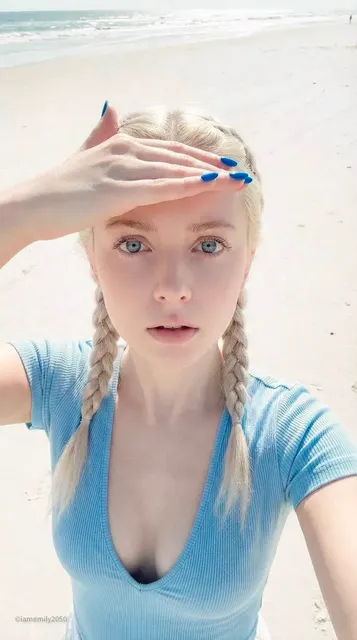

What is an AI virtual headshot generator?
An AI virtual headshot generator creates professional portrait images from text descriptions. You describe the framing, lighting, background, and style you want, then the tool generates a head-and-shoulders image suitable for profiles and professional use.
AI Virtual Headshot Generator
Neutral studio portrait
Input
A head-and-shoulders portrait of a person with a calm expression, soft even lighting, plain gray background, photorealistic style.
Expected output
A centered bust-style portrait with a clean background that reads as a headshot.
Approachable professional bust
Input
A friendly portrait of a person in a blue shirt smiling slightly, bright soft lighting, white background, realistic style.
Expected output
A warm, approachable head-and-shoulders image suitable for a personal profile.
Illustrated personal-brand headshot
Input
A stylized illustrated headshot of a person with glasses, flat-color modern illustration style, solid pastel background.
Expected output
A clean illustrated portrait that works for a creative personal brand.
Turn a written portrait description into a professional headshot-style image
Describe the framing
Specify the head-and-shoulders framing, lighting, and background in words.
Compare portrait looks
Generate several descriptions to compare expressions and styles before choosing one.
Review and download
Review the generated image, download it, and crop it into a headshot frame.
How It Works
1
Describe the portrait
Describe the desired image.
2
Choose generation settings
Choose the available generation settings.
3
Generate and review
Generate, review, and download a suitable result.
Writing a clear headshot prompt
Portrait details help the result read as a headshot.
Input Constraints
- Specify a head-and-shoulders framing so the result looks like a headshot.
- Name the lighting and background to keep the portrait clean.
- Review each result before use and refine the prompt if needed.
Practical Tips
- Mention the framing, such as head-and-shoulders or bust.
- Describe the lighting and a plain background for a clear portrait.
- Choose a realistic or illustrated style to set the overall look.
Privacy
- Do not upload personal or sensitive material unless you have permission to use it.
Usage Rights
- Confirm that you have the rights needed for the inputs and intended use of the result.
Prompt recipes
Copy a structure, then adjust the subject, lighting, camera, and output details for your own result.
Corporate LinkedIn headshot
A professional head-and-shoulders portrait of a person in a navy blazer, neutral expression, soft studio lighting, light gray background, photorealistic style.
Specifies corporate attire, neutral expression, and studio lighting that match standard LinkedIn headshot expectations.
Warm creative-industry headshot
A friendly portrait of a person with a genuine smile, wearing a casual button-up shirt, natural window lighting from the side, soft white background, realistic style.
Natural lighting and casual attire create an approachable look suitable for creative professionals.
Minimal illustrated avatar
A stylized illustrated headshot of a person with short hair and glasses, flat-color modern style, pastel blue background, clean lines.
Flat-color illustration and minimal background work well for personal branding and creative portfolios.
High-contrast dramatic headshot
A striking portrait of a person with side lighting creating strong shadows, dark background, intense gaze, black and white photorealistic style.
Side lighting and monochrome create dramatic impact suitable for artistic or creative fields.
Outdoor professional portrait
A head-and-shoulders portrait of a person in professional attire, soft natural outdoor lighting, blurred green foliage background, realistic style.
Outdoor lighting and natural background add warmth while maintaining a professional appearance.
Best use cases
Match the workflow to the input you have and the result you need before opening the generator.
LinkedIn profile photo
Input: Professional attire, neutral expression, studio lighting, plain background
Result: Clean corporate headshot suitable for business networking
Tool: Text-to-image generator with photorealistic style
Creative portfolio avatar
Input: Casual attire, friendly expression, natural lighting, illustrated or artistic style
Result: Approachable headshot that reflects creative personality
Tool: Text-to-image generator with illustration style
Social media profile picture
Input: Casual or smart-casual attire, genuine smile, bright lighting, simple background
Result: Friendly, relatable headshot for personal accounts
Tool: Text-to-image generator with realistic style
Conference speaker bio
Input: Professional attire, confident expression, clean lighting, neutral background
Result: Authoritative headshot for event materials
Tool: Text-to-image generator with photorealistic style
Limitations to know before generating
- Generated portraits are AI interpretations and may not match exact expectations.
- Results require human review to ensure the expression, lighting, and framing are suitable.
- The tool cannot guarantee photographic accuracy or specific facial features.
- You must verify you have rights to use the generated image for your intended purpose.
- Image quality depends on prompt clarity and generation settings chosen.
Creative Suite: AI Video Generator & AI Image Generator Tools
Power up your creative workflow with our AI-driven tools. Generate stunning videos, create images, and apply custom adjustments - our AI Video Generator and AI Image Generator offer a complete solution for all your creative needs.
Strictly Prohibits Adult/NSFW Content






Pricing
Choose the credit package that works best for you.
No hidden fees • Cancel anytime • Unused credits roll over
Starter
Perfect for trying out AI creation.
Credits
200 credits / month
- Up to 20 videos per month
- Up to 100 images per month
$6.99/ month$9.9930% OFF
Billed monthly
First-time subscribers get 30% off their first month, then standard price
What's included
- Credits never expire
- Standard models
- HD, Watermark-Free Downloads
- Private Generation
- Faster Generation Speed
- Ad-free experience
Basic
Perfect for light creators.
Credits
500 credits / month
- Up to 50 videos per month
- Up to 250 images per month
$13.99/ month$19.9930% OFF
Billed monthly
First-time subscribers get 30% off their first month, then standard price
What's included
- Credits never expire
- Standard models
- HD, Watermark-Free Downloads
- Private Generation
- Faster Generation Speed
- Ad-free experience
Pro
PopularBest value for creators
Credits
1,200 credits / month
- Up to 120 videos per month
- Up to 600 images per month
$39.99/ month
Billed monthly
What's included
- Credits never expire
- All models + Early access to new models
- HD, Watermark-Free Downloads
- Private Generation
- Faster Generation Speed
- Ultra HD resolution
- Ad-free experience
Ultra
For video creators and power users.
Credits
5,000 credits / month
- Up to 500 videos per month
- Up to 2,500 images per month
$99.99/ month
Billed monthly
What's included
- Credits never expire
- All models + Early access to new models
- HD, Watermark-Free Downloads
- Private Generation
- Faster Generation Speed
- Ultra HD resolution
- Ad-free experience
Free
Standard models only — upgrade to unlock premium models.
Credits
10 free credits on signup
Questions? Contact us at support@domer.io
Generate your virtual headshot
Open the generator, describe the portrait you want, and create a headshot-style image to review and download.