
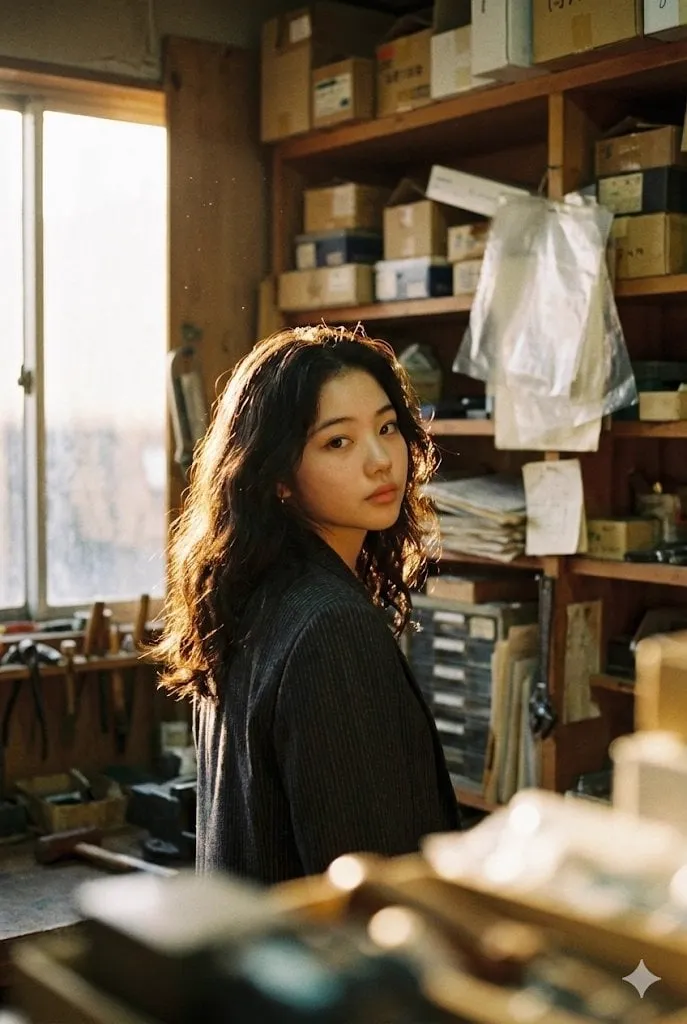

From Stills to Cinematic Motion
There is a moment in every filmmaker's process when a still image becomes a scene. A photograph that captures a mood, a location scout that shows the perfect room, a concept frame that finally makes the vision visible: all of these are static moments waiting for motion. For most of film history, adding that motion meant cameras, crews, and budget. Today, a new generation of AI tools turns still images into photorealistic video, and it is changing who gets to make films.
The capability is deceptively simple to describe: you provide an image, the model animates it. The image can be a photograph, a painting, a generated concept frame, or a frame from an existing video. The model extends it in time, producing a sequence where the scene breathes, light shifts, and subjects move with physical plausibility. What was once a still becomes a window into a moving world.
For creators, the implications are enormous. A concept artist's frame becomes a previsualization clip. A location photo becomes a test of how the scene will feel in motion. A single reference image of a character becomes the first shot of a sequence. The distance between imagination and moving image, which used to require substantial production resources, has collapsed to a prompt and a few minutes of compute.
What Photorealism Means in AI Video
Photorealism is a loaded word, so it helps to be precise. In the context of AI video, a photorealistic result is one that follows the physical rules of the real world closely enough that a viewer accepts it as footage. That means reflections behave correctly, depth of field matches the optics of a real lens, objects occlude each other properly, and motion obeys the laws of physics.
This is a much higher bar than image realism. A photorealistic still image can be a single impressive frame. A photorealistic video must be impressive every single frame, and the frames must relate to each other coherently. The model has to remember what the scene looked like two seconds ago, keep the lighting consistent, and make the motion continuous. Any break in that continuity snaps the viewer out of the illusion.
The technical engine behind this is a combination of large-scale training data and architecture designed for temporal consistency. Modern models learn not just what things look like, but how they move: how fabric drapes, how water flows, how skin catches light. When you animate a still, the model draws on that learned physics to fill in the motion between the frames it can see.
The result is a new creative material. Directors can now test lighting, camera moves, and pacing with photorealistic footage before committing real production resources. What used to be a hunch becomes a preview.
Why Image-to-Video Matters for Creators
Text-to-video gets most of the attention, but image-to-video is often the more practical tool in a professional workflow. The reason is control. When you start from an image, you are starting from a decision you already made. The composition is fixed, the character is defined, the mood is set. The model's job is narrower and more reliable: bring that specific vision to life.
Consider a brand campaign. The art director approves a key visual, a hero image that captures the campaign. With image-to-video, that approved image becomes the opening shot of a video spot, and the campaign extends from stills to motion without renegotiating the creative direction. The approval chain stays intact, and the risk of the video drifting away from the approved concept drops sharply.
Consider character work. You have spent time building a character reference pack, and you know exactly how the protagonist looks. Image-to-video lets you use that same reference as the first frame of a scene, so the video inherits the established identity. No regeneration lottery, no surprise redesign in the middle of a sequence.
For small studios and independent creators, this control is what makes AI video a production tool rather than a toy. The image is the anchor, and the model operates within the space the image defines.
The Model Landscape: Premium Tier
The quality of image-to-video results depends heavily on which model you choose, and the landscape in 2025 offers distinct tiers. At the top sits a group of premium models built for maximum photorealism.
These models excel at complex lighting, realistic skin and materials, and physically coherent motion. They are the models you reach for when the scene includes reflective surfaces, water, crowds, or anything where small physical errors would be immediately visible. Their cost and generation time are higher, which makes them the right tool for hero shots and final renders rather than for exploring options.
The premium tier also leads in prompt adherence. When you specify a camera move, a time of day, or a lens behavior, these models deliver it with fewer reinterpretations. For directors who care about matching a specific visual language, that adherence is worth the extra cost.
The practical advice is to reserve the premium tier for the shots that will carry the project. A campaign hero shot, an opening sequence, a character introduction: these are where the photorealistic quality is visible and where it pays for itself.
Speed-First Models from Asia
A second tier of models, many of them developed in Asia, has built its reputation on speed and specific strengths. These models are engineered for fast iteration, which makes them ideal for the early stages of a project when the team is still exploring directions.
The speed advantage changes the workflow. When a generation takes seconds instead of minutes, the director can test many variations of a shot in a single session: a slow push-in, a lateral dolly, a handheld feel, a static frame. Each test informs the next, and the exploration converges quickly on the right approach. In traditional production, this kind of experimentation is prohibitively expensive; with fast models, it becomes the default.
Some of these models also have specialized strengths, such as excellent performance on specific subjects like faces, animals, or stylized content. Matching the model to the subject is part of the craft of AI directing. A model that is exceptional at character close-ups may be average at landscapes, and choosing accordingly is what separates good results from great ones.
The workflow pattern that emerges is two-tier: fast models for exploration, premium models for final renders. The fast models give the team confidence in the direction, and the premium models deliver the polish.
Specialized Models for Effects and Detail
Beyond the general-purpose tiers, a set of specialized models handles particular effects and technical demands. These are the tools for the shots that general models struggle with.
Some specialize in physics-heavy effects: explosions, smoke, cloth, liquid. General models approximate these phenomena, but specialized models have been trained intensively on them and produce dramatically better results. For an action sequence or a product shot with flowing liquid, the specialized model is worth the extra step in the pipeline.
Others specialize in detail preservation: faces at close range, intricate textures, text in the scene. AI video has historically been weak at rendering legible text and stable faces, and specialized models close that gap. When the shot includes a sign, a product label, or a close-up of a face, using the right specialized model prevents the artifacts that would otherwise break the illusion.
The skill of the AI director includes knowing which model to call for which shot. The general models are versatile, but the specialized ones are the difference between acceptable and excellent in their domains. A good pipeline routes each shot to the model best suited for it.
Directing the Shot: Scene and Character Consistency
The hardest part of image-to-video is not generating a single convincing clip; it is generating a sequence of clips that belong to the same film. Consistency across shots is what separates a collection of AI clips from a scene.
Scene consistency means the world stays the same: the same location, the same lighting direction, the same time of day, the same props in the same places. If shot one shows a room lit by a window on the left, shot two cannot show the same room lit from the right without a story reason. Maintaining this requires discipline in the prompts and references, and it is where image-to-video earns its keep, because the starting image anchors the world.
Character consistency means the people stay the same: the same face, the same wardrobe, the same presence. This is where reference packs and fusion techniques matter. When every shot starts from a reference-conditioned frame, the character carries across cuts.
The director's toolset for consistency includes establishing shots that define the world, reference packs that define the characters, and careful prompt discipline that keeps variables controlled. Change one thing at a time, and the sequence stays coherent.
Video Fusion and Reference Control
The technical technique that powers much of this consistency is video fusion: the model conditions the generation on reference material rather than on text alone. The reference can be a character image, a style frame, a location photo, or an existing clip.
Reference control works because it gives the model concrete information instead of forcing it to interpret words. When the prompt says "the detective walks into the warehouse," the model has to guess what the detective looks like. When the prompt includes a reference image of the detective, the model knows. The guesswork shrinks to the parts of the scene that are genuinely new.
The same logic applies to style. A style reference frames the whole project: the color palette, the grain, the lighting approach. Every shot generated with that reference inherits the look, and the project gains a visual identity that survives across hundreds of clips.
For long-form work, reference control is not optional. It is the mechanism that keeps a series coherent, that lets a character appear in twenty different scenes and remain recognizable, and that turns a batch of AI clips into a film.
The Infrastructure Behind Reliable Generation
Consistency also depends on the infrastructure that runs the generation. A photorealistic video project generates hundreds of clips, and managing them at scale requires more than a good model.
Resource management is the first concern. Generation is compute-heavy, and a project that generates without discipline will burn through its budget and its patience. Modern pipelines queue tasks, allocate GPU resources, and prioritize work so that the critical shots render first and the exploration runs on cheaper capacity.
Asset management is the second. Every shot, every reference, every prompt variant needs to be tracked. When the director changes the ending, the team needs to know which shots are affected and which references are current. A good pipeline treats prompts and references as versioned assets, not as ephemeral inputs.
The third piece is quality control. Automated checks catch common failure modes: flickering, warping, identity drift. The pipeline flags problem shots for review instead of letting them slip into the edit. This is the difference between a process that occasionally produces something great and a process that reliably produces something good.
A Practical Workflow for a Small Studio
Putting it together, a small studio or independent creator can build a photorealistic image-to-video workflow in a few steps.
Start with the image. Build or source the stills that anchor each scene: concept frames, location photos, character references. These are the creative foundation, and they deserve care.
Second, define the references. Create the character pack, the style frame, the location set. Lock the visual identity of the project before generating anything.
Third, explore with fast models. Generate variations of each shot, test camera moves and pacing, and converge on the direction. Keep the exploration cheap.
Fourth, render the final shots with premium models. Use the selected variations as starting images, apply the references, and produce the hero quality output.
Fifth, review in sequence, not in isolation. Watch the clips in order, check continuity, and fix drift before it compounds. The edit is where the film is made, and the AI clips are its raw material.
Sixth, track everything. Version the prompts and references, note what worked, and build a library of reusable assets for the next project.
Frequently Asked Questions
What is the difference between image-to-video and text-to-video? Image-to-video starts from an existing image and animates it, which gives more control over composition and identity. Text-to-video starts from a description and generates everything, which offers more freedom but less predictability.
How many reference images do I need for a consistent character? Five to eight well-chosen references are usually enough: front, profile, three-quarter, expressions, and wardrobe variations. Quality matters more than quantity.
Why does my generated video flicker? Flickering usually comes from the model struggling with temporal consistency in complex areas like hair or fine textures. Using a higher-quality model, stabilizing the starting image, or simplifying the moving elements can help.
Can I use my own photos as starting images? Yes, and for many projects that is the best approach. A real location photo or a real product shot gives the generation a grounded starting point that text alone cannot match.
Is photorealistic AI video ready for commercial production? For many categories, yes. Hero shots, previsualization, product visualization, and concept testing are all viable now. For full feature-length production, the technology is still a powerful assistant rather than a complete replacement.
Do I need a powerful computer to use these models? Most professional workflows run the models in the cloud, so the computer just needs a good browser. Local tools exist but are more limited by hardware.
Final Thoughts
The step from still image to moving picture has always been the step where filmmaking gets expensive. AI has not removed that step, but it has made it accessible. A creator with a good image, a clear reference set, and a disciplined workflow can now produce photorealistic motion that would have required a full production team a few years ago.
The craft is shifting accordingly. The new skills are not about operating cameras and lights; they are about choosing images well, building references, directing the model shot by shot, and maintaining consistency across a sequence. Those skills are learnable, and they compound: every project builds a library of references and lessons that makes the next one faster and better.
For independent filmmakers, small studios, and brands, the opportunity is real. The tools are here, the quality is production-viable, and the barrier is no longer budget. It is the vision, the discipline, and the willingness to direct a new kind of film.
