
Limited Time Sale: Get 40% OFF on Next-Gen AI Video Creation 🎉
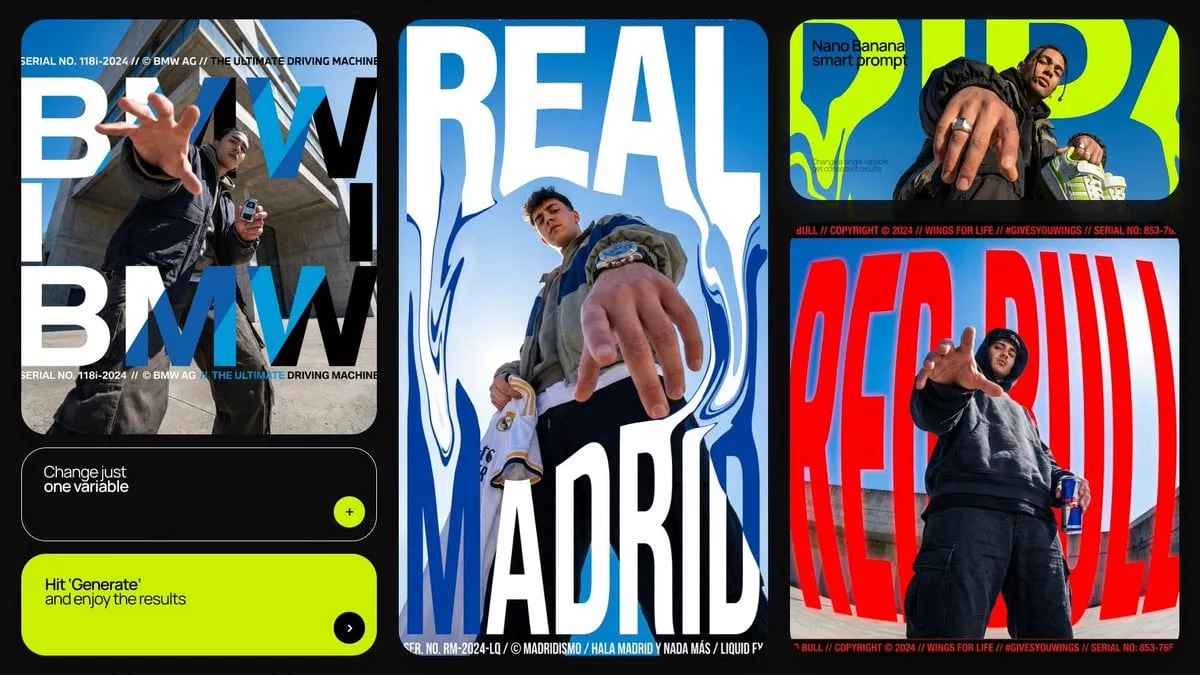
![[BRAND NAME] | [SLOGAN]. Act as a Professional Editorial Art Director](https://storage.brightvectorlabs.com/prompts/bright/poster-design/2027040971016351786-0.webp)
[BRAND NAME] | [SLOGAN]. Act as a Professional Editorial Art Director
A
AmirMušić@AmirMushich
380 35,340 2/26/2026
Model Nano Banana 2
Nano Banana 2Categories
Share:
Prompt
[BRAND NAME] | [SLOGAN]. Act as a Professional Editorial Art Director.

PHASE 1: PHYSICS & GROUNDING (THE "STABILITY" RULE).
- Analyze [BRAND NAME] category:
  * CATEGORY A (Active/Sports/Fashion): The subject (person) is in a high-intensity leap, detached from the ground, silhouette against the sky.
  * CATEGORY B (Automotive/Heavy Goods): The subject (vehicle) must be HEROICALLY GROUNDED. Place the car firmly on a solid surface (asphalt, concrete, or rock).
  * Perspective: Use an extreme low-angle (worm's-eye view). The car must look massive and dominant, anchored to the bottom of the frame, towering over the viewer. NO floating or flying for vehicles.

PHASE 2: DYNAMIC PHOTOGRAPHY & LIGHTING.
- Environment: A vast, clear blue sky with minimal soft clouds.
- Lighting: Natural, direct sunlight. High-contrast shadows on the subject to emphasize form and texture.
- Style: High-end 8k commercial photography. Sharp focus.

PHASE 3: TYPOGRAPHY & LAYOUT (MATTE FINISH).
- Layout: Use the text from "[SLOGAN]" as massive, ultra-condensed bold sans-serif characters.
- Execution: Split "[SLOGAN]" into two parts: one on the far left, one on the far right.
- Depth: A part of the subject (e.g., a bumper, a mirror, or a person's limb) must overlap the letters to create a 3D effect.

PHASE 4: COLOR STRATEGY (MATTE & REALISTIC).
- Graphic Color: NO NEON. Use a solid, matte brand color for the text (e.g., flat Navy for BMW, flat Red for Red Bull). The color must be opaque and non-glowing, resembling high-quality print ink.
- Photo Color: Maintain authentic, rich photographic colors for the subject and the sky. The contrast comes from "Flat Graphic vs. Realistic Photo".

PHASE 5: FINAL BRANDING.
- Logo: Small minimalist [BRAND NAME] logo in the upper corner.
- Metadata: Tiny secondary text in a clean sans-serif font at the bottom for a technical/editorial look.
How to Use This Prompt
Get started in three simple steps.
1
Copy or Use
Copy the prompt text, or click Use this Prompt to open the generator with it pre-filled.
2
Adjust Settings
Tweak the aspect ratio, resolution, or any other settings to fit your project.
3
Generate & Share
Hit generate and share your creation once it's ready.
Related Prompts
![[PERSON NAME]. Act as a high-end sports graphic designer creating a conceptual…](https://storage.brightvectorlabs.com/prompts/bright/poster-design/2008976966255337666-0.webp)
![[BRAND NAME] | [HEADLINE] | [SUB-TEXT] | [CTA]. Act as a Senior Art Director](https://storage.brightvectorlabs.com/prompts/bright/product-and-brand/2026316195977146728-0.webp)
![[BRAND NAME]. Act as a Social Media Art Director and Digital Collage Artist…](https://storage.brightvectorlabs.com/prompts/bright/poster-design/2020895358126002197-0.webp)
![A minimalist cinematic colored poster featuring a [Character Name]’s portrait…](https://storage.brightvectorlabs.com/prompts/bright/poster-design/2019338808009920744-0.webp)

By Media Type


Create stunning images with this prompt
Open the generator and start creating in seconds